SOPHOS XG V18 FIREWALL RULES & NAT POLICIES
11/29/20 - firewall,sophos,kb
In XG v18, NAT policies were split from Security(Firewall in XG) rules. You can, however, create a “linked” NAT rule, which will only trigger when traffic passes that specific Security rule. But this won’t be covering that method.
Instead, this will be covering how to setup Firewall/Security and NAT rules on a system which splits those rules. In many firewalls you will come across, Security and NAT rules are kept and created separately.
This also largely covers the theory of firewall rules and NAT policies. While it is sort of brand specific to Sophos XG’s, the concept works across the majority of major firewalls.
Things to keep in mind:
- When you see a # before a Portnumber in Sophos XG, it’s referencing the Interface IP, not the interface, itself.
- The term Firewall/Security/Access Rule can vary from firewall manufacturer to firewall manufacturer -but they are all one in the same, and used interchangeably. If the words are switch up within the document, keep in mind they all are used in the same context.
The Different Types of NATs
Types of NAT’s:
There are 3 main types of NAT’s:
- DNAT - Destination NAT
- This would be used when you are hosting a service or application, such as OWA
- SNAT - Source NAT
- This would be used for LAN > WAN traffic, but can be used for other situations, as well
- PAT - Port Address Translation
- Used for port forwarding. Say I want to have public port :80 translate to :8080 on the destination server
NAT vs Security Rules:
If I want to host a service, I have to use a DNAT rule, but also create a related Security rule. But why both, and what is the difference?
What is the difference between a Security rule and a NAT rule?
- A Security rule just states that something from a specific network/IP can talk to a target network/IP.
- A NAT rule is like an if/then statement.
- IF X IP is talking to Y IP on Z Port
- THEN transplate/forward [...]
To completely water it down for this scenario:
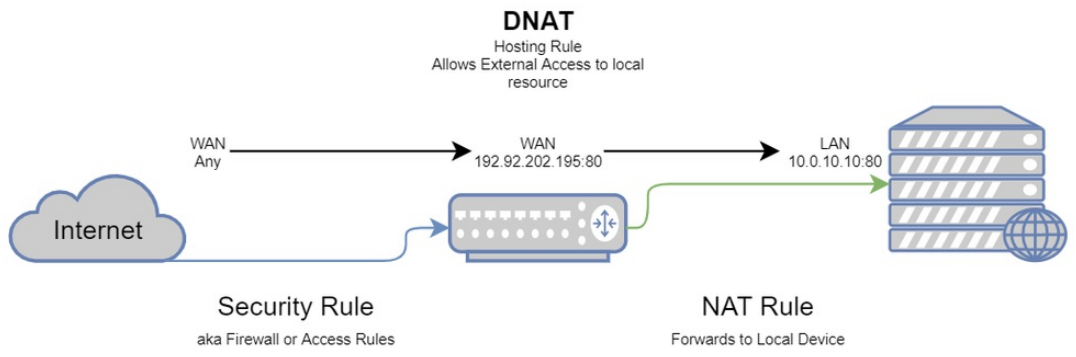
- The Security rule states that traffic from X IP can hit Y public IP for Z service.
- Any —to–> 192.92.202.195:80
- The DNAT rule states that traffic from X hitting Y:Z will be forwarded to local IP A:Z.
- Any —to–> 192.92.202.195:80 —forwarded–> 10.0.10.10:80
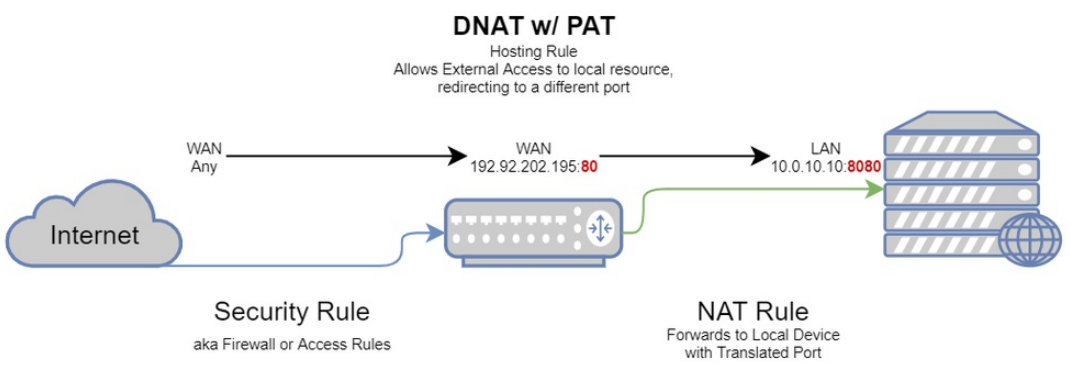
- A PAT can also be used in a DNAT, which would state traffic from X hitting Y:Z will be forwarded to local IP A:B – with B being the destination port on my local server
- Any —to–> 192.92.202.195:80 —forwarded–> 10.0.10.10:8080
To side-step slightly, here’s an example of a SNAT:
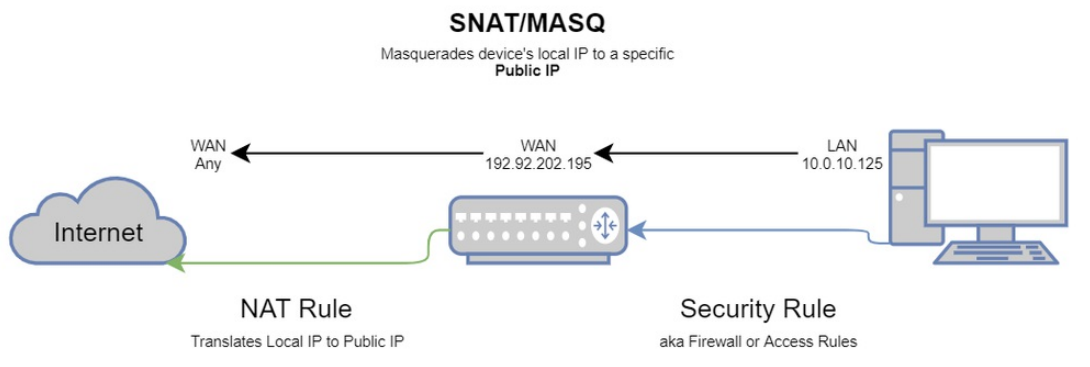
- The Security rule states that traffic from my local LAN X can go to Destination Y (we’ll use WAN as an example)
- 10.0.10.0/22 —to–> Any(WAN)
- The resulting SNAT rule would state LAN X can go to Destination Y, but as Public IP Z. This is also known as a MASQ.
- 10.0.10.0/22 —as–> 192.92.202.195 —to–> Any(WAN)
To further complicate things, we can also masquerade the source IP of a public IP.
- The Security rule states that traffic from X IP can hit Y public IP for Z service.
- Any —to–> 192.92.202.195:80
- The NAT rule would have a SNAT & DNAT state that traffic from X IP will present as Y IP (firewall interface) when accessing Z public IP for A service will be forwarded to B local IP
- Any —to–> 192.92.202.195:80 —as–> 10.0.10.1 —forwarded–> 10.0.10.10:8080
- Doing this, however, isn’t ideal. When looking at the application’s logs, you would only see the firewall’s IP instead of the actual public IP accessing the service.
Hosting Rules (WAN > LAN)
Hosting – Destination NAT: Theory is all well and good, but how does it look in practice? When hosting something, the Security rule will be the Public aspect, and the NAT will describe how that will be translated to the Local aspect.
Just to help with a visual representation, review the below picture.
In the below example, we’re going to go through hosting a web server on a non-standard port, in a LAN zone.
This is the Security rule for the web server, which only references the Public side of the matter.
We’re stating that from the WAN Zone (1), from Any IP (2), attempting to talk to our IP or Interface (4) over Service/Port (5) is Accepted (6).

But that’s only half of the story. With out a NAT policy to explain what happens to that traffic, it’ll just sit there at the firewall.
So let’s go ahead and make our DNAT rule (it’s shown below). You’ll notice the screen will be similar to the Firewall rule screen.
When you see Original in relation to a NAT policy, it means that it is not being changed from it’s source. For instance, from the below, (1 & 2) – the original IP from the public IP accessing our server will not be changed, just like with the service/port (5 & 6).
However, since this is a Destination NAT rule, we will be translating the original destination. Looking at (3) which is the Public IP (remember that #Port2 is referencing the IP of Port2, not the interface itself) of our firewall, we are going to translate the destination for that traffic to go to the local server hass on our local network.
If you look further down, you’ll see I’m also referencing the actual Interfaces on this rule, as well. While this isn’t quite necessary in all situations, it does help make sure the NAT Policy only applies to very specific traffic. The Inbound Interface is self explanatory – traffic is coming in from the WAN, which is Port2. But why is the Outbound Interface also Port2? It’s a bit misleading, but it’s related to how you are referencing the Public IP of Port2, so that port, in this instance, is indeed the Outbound port from the WAN zone to our LAN.

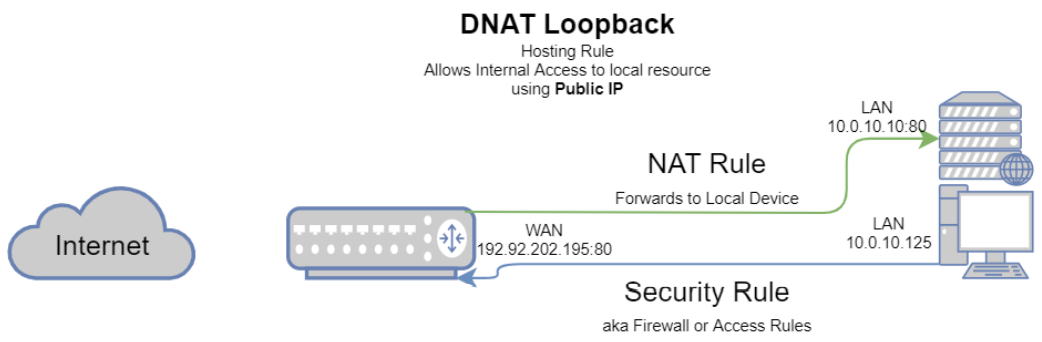
Hosting – Loopback/Hairpin NAT: But what if you want to keep things simple, and your users in your LAN zone also need to access this service? But instead of giving them a separate IP to access while internal, you just have them access the public IP? It should work with the existing rule, right? Well, not quite.
To aide in visualization, refer to the below image.
For the sense of security and fine-tuned control, I prefer to keep my WAN > LAN & LAN > LAN NAT and Security rules separate. The reason being that if I need to cut something off right away, it’s just turning off 1 or 2 rules, instead of having to edit a rule handling several things.
So, for the same web server as above, below you will find the Loopback NAT rule. Here you will see that I actually further defined the network for the rule, by looking at (2).
This rule states that the network (2) from zone (1) attempting to access public IP (4) on service:port (5) will be accepted (6).
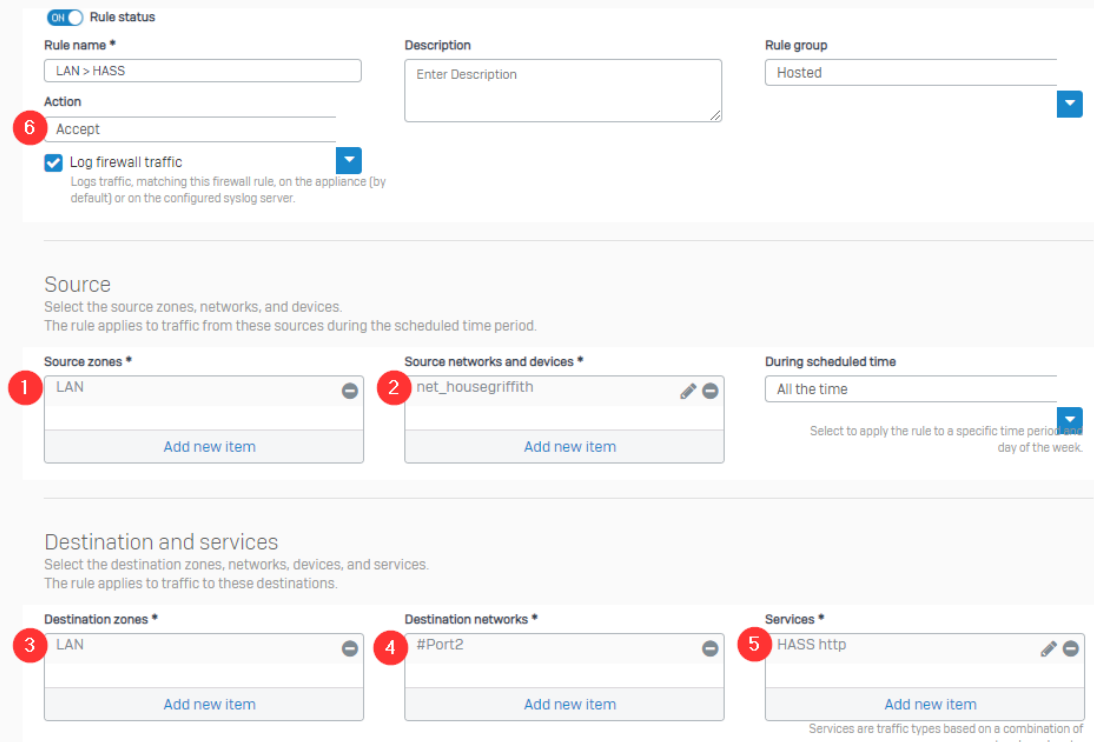
Pretty straight forward, right? Just like the DNAT > App rule, but instead of WAN/Any as the source, it’ll be LAN/network. But how do we build that NAT Policy while not letting it muck up any other rules we might have?
It’s actually quite similar to the differences we made for the Security rule. If you look below, you’ll see all we changes was (1, 2, & 7).
But why the SNAT (2)? It’s how the traffic is handled. If you ever create a LAN > WAN rule without a MASQ/SNAT, you’ll realize traffic never leaves your network – you can’t visit Google.com. This is because when your traffic leaves your network, it’s supposed to use your public IP. So when you hit your Public IP with your LAN IP, it’ll be dropped. So, just like when you’re attempting to hit any public location, you need to have a MASQ/SNAT to translate your LAN IP to your WAN IP.
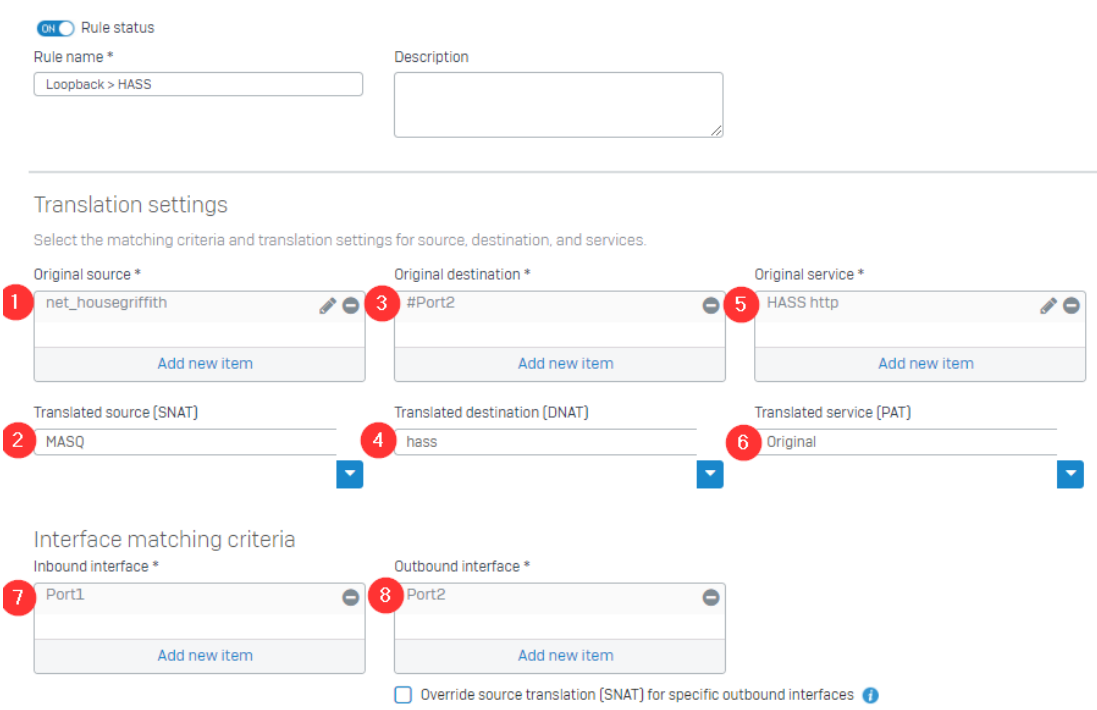
Outbound (LAN > WAN)
Outbound – Source NAT: Outbound traffic is handled quite a bit differently. In order for your computer with a Local IP to be able to traverse the internet properly, it requires a Public IP. This is done using a MASQ, and for a couple different reasons.
- A Public IP is required to correctly access other Public IPs.
- Traffic will appear to come from the Gateway instead of the actual computer access the internet.
- An IP Masquerade is the foundation for a heavily secured networking environment. With a well built firewall, breaking the security of a well configured masquerading system and internal LAN should be difficult to accomplish.
This is likely the simplest rule in the firewall. By default, the MASQ is set as the WAN IP of the device doing the masquerading (the Sophos XG, in this example).
- The corresponding Firewall/Security/Access rule is where you would set any Web Filtering, SSL Inspection, etc.
Let’s start by taking a look at the relative Security Rule.
This states that the network (2) from this specific Zone (1) attempting to access Any network/IP (4) in the specific Zone (3) is Accepted (6). This also does not restrict any accessible services (5).

The related NAT Rule is just as simple.
Anything from the specific network/IP (1) coming from interface (7) will masquerade as specific IP (2), when attempting to visit Any network/IP (3) via interface (8).
With SNAT rules, the DNAT & PAT sections are generally left untouched. There may be a use at some point that you would want to use those, but this document will not cover those scenarios.
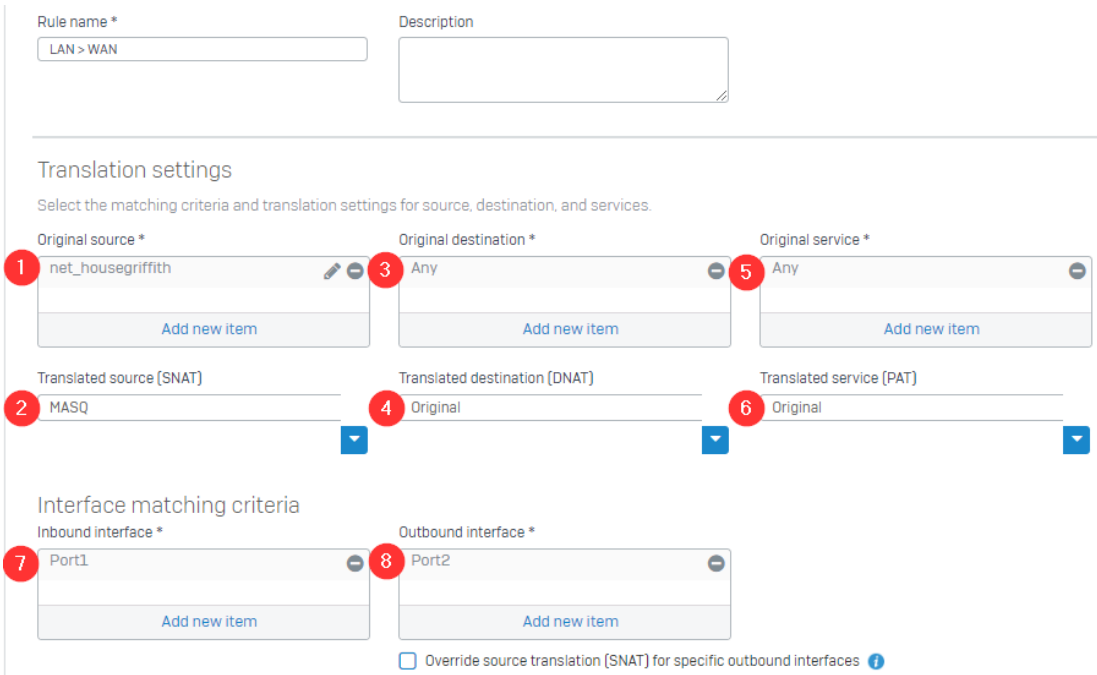
But, here is where you could potentially have a problem. The Order of Your Rules is VERY important. But this is why we also set the Inbound and Outbound interfaces. If you were to have multiple networks the router is handling, were you not to set the Outbound Interface, you could potentially allow traffic from the source network to access any of the other networks (if there is a corresponding or also incorrectly setup Security rule)
Rule Order
Rule order works from Top to Bottom. Once traffic hits a specific rule, it stops processing further.
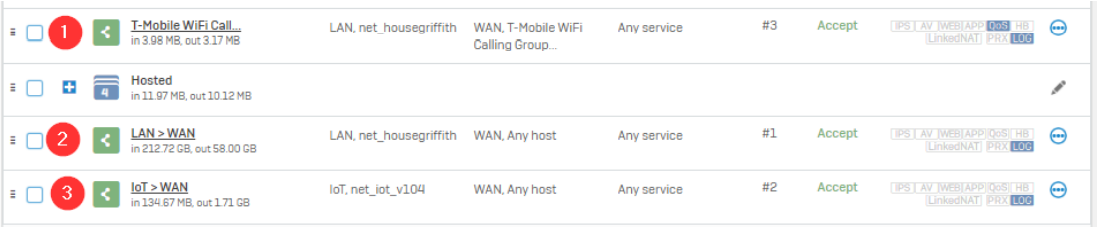
If we look below, you’ll see a list of Security rules, denoting how traffic can leave the network (these are all LAN > WAN).
If a device is going to talk to specific IPs designated as a destination on Rule 1, none of the following rules ever come in to affect. You would do this sometimes when Web Filtering or such is being problematic for specific sites, despite whitelisting – you can create another Security rule that states all traffic to X destination does not have Web Filtering processed.
Comments Section
Anon - 2021-10-05
I really appreciate this explanation.
Kyle - 2021-10-21
this really helps make it understandable how they have this setup
Steven - 2021-11-12
I know this is related to Sophos but it really helps explain how it works across all firewalls